 Subscribe by RSS
Orientation and Mounting of Hard Disk
The following article is to discuss the ‘Orientation and Mounting of Hard Disk‘!
Orientation refers to how the hard disk drive is physically installed into the PC. In the majority of cases the drive is installed in the “default” way: flat, with the drive parallel to the ground, the logic board facing down and the drive label facing the sky. Some PC cases, however, especially the smaller desktop boxes, have side-mounted hard disk bays. Either of these orientations is common and should present no problems. In fact, most manufacturers say that you can mount their drives any way you wish, even upside-down if it is necessary. That said, my personal opinion–one shared by at least one manufacturer–is that you should avoid strange mounting positions if it all possible. The reason is simple: most testing of drives is done with them in either of the standard orientations. Hard drive manufacturers don’t do nearly as much testing of drives mounted upside-down as they do of drives right-side up. For the sake of reliability, it’s best to keep things simple if at all possible, and well, go with the flow.
Older hard disks that used stepper motor actuators were much more sensitive to orientation. It was in fact often recommended that the low-level formatting of the disk always be done after the disk was installed in its operating position, to avoid any shifting of the location of the tracks that might be caused by changing the orientation. Since hard disks today are much more solidly built, and they use voice coil actuators for dynamic head positioning, this really is not an issue. A modern hard disk can be side-mounted in the case without any problems, and can also have its orientation changed after it has been in use for some time.
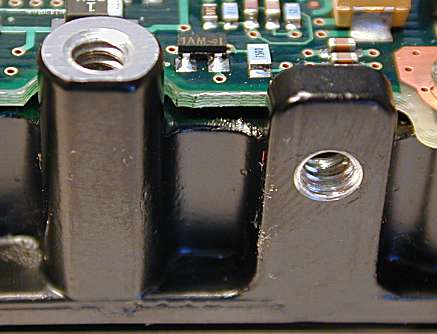
Most hard disks have screw holes built right into the aluminum base of the disk itself. They can usually be mounted by screwing into the bottom of the base, or the side. There are some caveats here. First, make sure you use small screws, preferably the ones that came with the hard disk–using ones that are too long can in theory damage the drive. Second, since the circuit board is exposed, it must be carefully watched to ensure that there is no chance that it will be contacting anything when the drive is installed, or the logic board could be shorted out.
Data recovery Salon welcomes your comments and share with us your ideas, suggestions and experience. Data recovery salon is dedicated in sharing the most useful data recovery information with our users and only if you are good at data recovery or related knowledge, please kindly drop us an email and we will publish your article here. We need to make data recovery Salon to be the most professional and free data recovery E-book online.
World’s Top Data Recovery Hardware Tools
Easy to use at good price
Recover SATA, IDE, External HDDs, NVME SSDs, etc Order Now here
POTABLE DEVICE & NVME SSD RECOVERY TOOL
Recover USB Device and NVME SSDs at high speed! Read Details here.
DFL-PCIE DATA RECOVERY RECHARGE
Best data recovery hardware tool to start a data recovery business, read details here
RECOVER SCRATCHED HDDS

Recover lost data from scratched hard drives, read details here.
SURFACE PRO. RECOVERY
BEST HEAD REPLACEMENT TOOLS
The most cost-effective head replacement tools for Seagate, WD, Samsung, Hitachi, Toshiba, Fujitsu