 Subscribe by RSS
Spindle Motor Power Usage at Spin-Up
Most of the power used by a modern hard disk drive is taken up by the spindle motor. Due to their smaller, more efficient designs, newer drives require relatively little power to keep their platters spinning continuously. Even drives with faster spindle speeds take less power than the large, inefficient motors of the drives of a decade ago. However, when the hard disk is first started up, the motor can draw a peak level of power that is more than two times what it takes to keep the disks spinning. (Most things require more energy to start them in motion than to keep them in motion, but in the case of hard disk motors this is especially so because of their electrical characteristics.) While in most cases even the peak start-up power usage isn’t all that much, there can be an issue when you are using multiple hard disks that all try to spin up at once when you turn on the machine. The ratings of your power supply, particularly for the +12 V level, must be sufficient to take this initial demand into account.
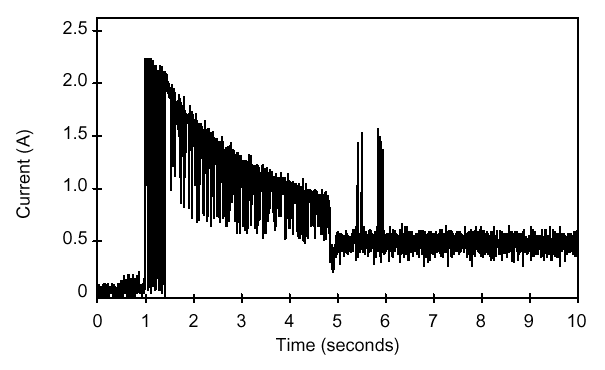
Hard drive manufacturers generally program their drives so that when two are used on the same IDE channel as master and slave, the slave drive delays its spin up by several seconds to offset its start from that of the master drive, and reduce the peak demand on the power supply. Similarly, many SCSI drives can be programmed to delay their startups, using the “Remote Start” command or a special jumper. These features offset the time that the drives spin up to reduce the peak demand on the power supply.
Another issue with spin-up relates to boot speed. In order for the system to boot up properly when it is turned on, the platters must be brought from a standstill to operating speed in a relatively short period of time. Modern PCs often have “expedited” BIOSes that go from power on to attempting to boot the hard disk in only a few seconds. If the disk isn’t ready, often the system will hang, even though it will boot if you press the reset button and start the boot process over again. Some system BIOSes include a delay feature that can be used to slow down the boot process to avoid this problem. Otherwise, slowing down the boot process by turning on the memory test feature, for example, can sometimes cure this problem.
Data recovery Salon welcomes your comments and share with us your ideas, suggestions and experience. Data recovery salon is dedicated in sharing the most useful data recovery information with our users and only if you are good at data recovery or related knowledge, please kindly drop us an email and we will publish your article here. We need to make data recovery Salon to be the most professional and free data recovery E-book online.
World’s Top Data Recovery Hardware Tools
Easy to use at good price
Recover SATA, IDE, External HDDs, NVME SSDs, etc Order Now here
POTABLE DEVICE & NVME SSD RECOVERY TOOL
Recover USB Device and NVME SSDs at high speed! Read Details here.
DFL-PCIE DATA RECOVERY RECHARGE
Best data recovery hardware tool to start a data recovery business, read details here
RECOVER SCRATCHED HDDS

Recover lost data from scratched hard drives, read details here.
SURFACE PRO. RECOVERY
BEST HEAD REPLACEMENT TOOLS
The most cost-effective head replacement tools for Seagate, WD, Samsung, Hitachi, Toshiba, Fujitsu